

A practical guide to SSL VPN secure remote access, including authentication, least-privilege controls, validation and troubleshooting.
SSL VPN යනු කුමක්ද?
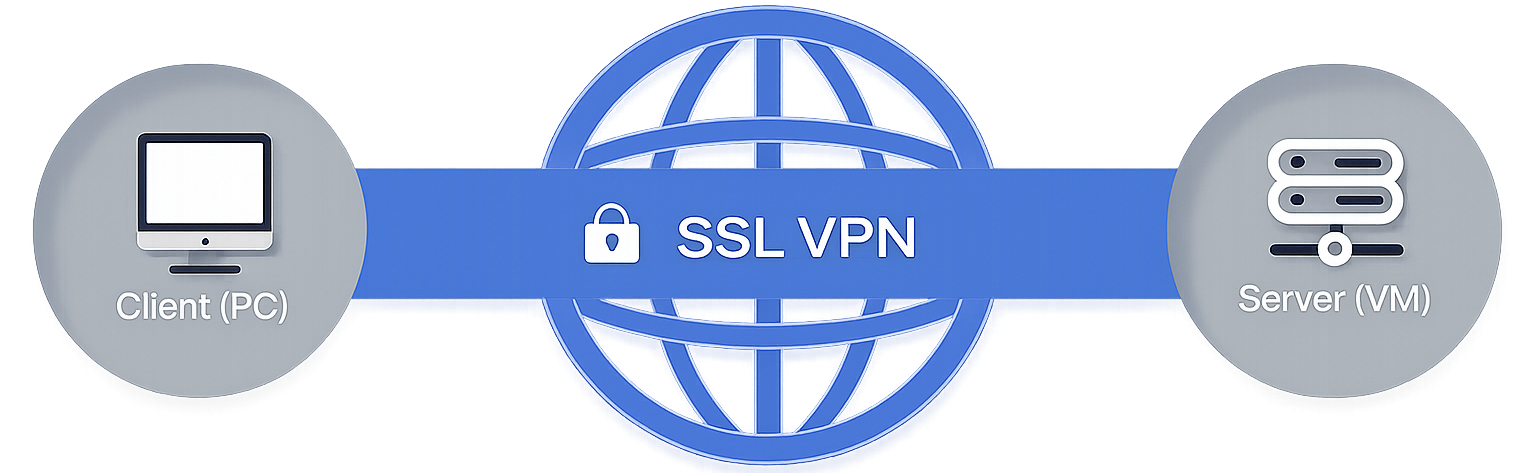 Secure Socket Layer Virtual Private Network (SSL VPN) යනු දුරස්ථ (Remote) පරිශීලකයන්ට විශේෂිත Client Software එකක් ස්ථාපනය කිරීමේ අවශ්යතාවයකින් තොරව Web Applications, Client-Server Applications, අභ්යන්තර ජාල (Internal Network) සේවාවන් සහ Directory Resources වෙත ආරක්ෂිතව ප්රවේශ වීමට ඉඩ සලසන VPN තාක්ෂණයකි.
SSL VPN මඟින් Public Networks සහ Private Networks හරහා ගමන් කරන සියලුම දත්ත සන්නිවේදනය ආරක්ෂිතව සිදු කරයි. Web Browser එක සහ SSL VPN උපාංගය අතර හුවමාරු වන සියලුම දත්ත SSL Protocol හෝ එහි නවතම සංස්කරණය වන TLS (Transport Layer Security) මඟින් Encrypt කරනු ලැබේ.
සාම්ප්රදායික WAN (Wide Area Network) සම්බන්ධතා සහ IPSec VPN විසඳුම් භාවිතයේදී ඇතිවන සංකීර්ණතා සහ අපහසුතා රැසකට SSL VPN විසඳුමක් ලබා දෙයි. එහි පහසු භාවිතය හේතුවෙන් සේවක කාර්යක්ෂමතාව වැඩිවන අතර, ආයතනවල පිරිවැය අඩුවීම සහ ව්යාපාරික කාර්යයන් වඩාත් ඵලදායී ලෙස සිදු කිරීම සඳහාද උපකාරී වේ.
නිසි ලෙස ක්රියාත්මක කර භාවිතා කරන විට, SSL VPN මඟින් ජාල ආරක්ෂාවට (Network Security) කිසිදු අහිතකර බලපෑමක් ඇති නොකර ආරක්ෂිත දුරස්ථ ප්රවේශයක් සපයයි.
SSL VPN වර්ග
SSL VPN ප්රධාන වශයෙන් වර්ග දෙකකට බෙදේ:
1. SSL Portal VPN
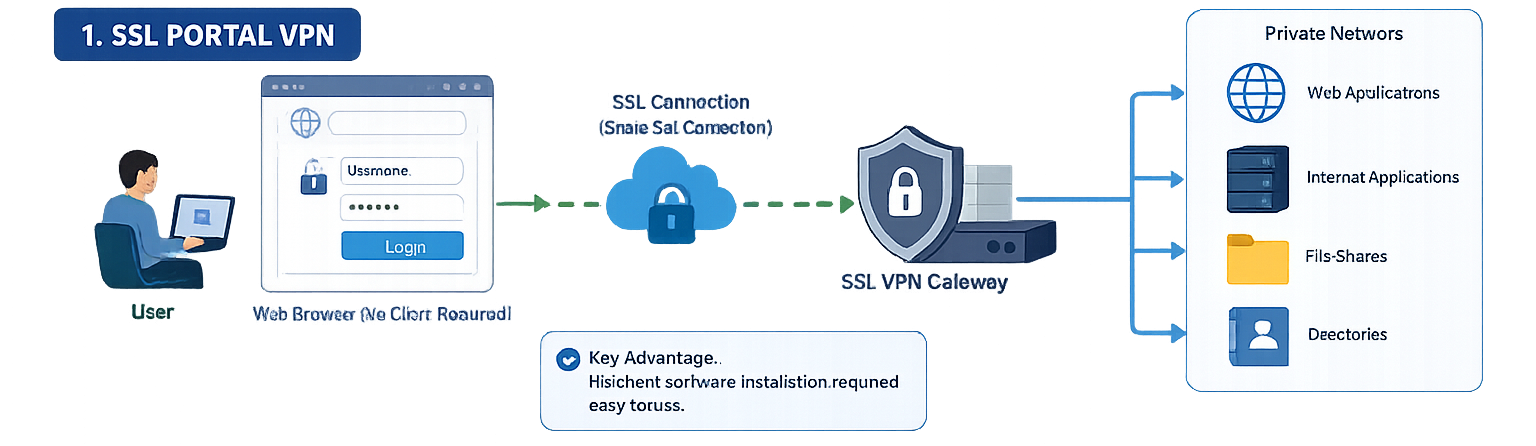
SSL Portal VPN එකක් මඟින් තනි SSL සම්බන්ධතාවයක් (Single SSL Connection) හරහා වෙබ් අඩවියකට පිවිසී, එමඟින් පෞද්ගලික ජාලයේ (Private Network) විවිධ සේවාවන් සහ සම්පත් වෙත ප්රවේශ විය හැකිය.
මෙය "Portal" ලෙස හඳුන්වන්නේ එක් Web Page එකක් හරහා විවිධ අභ්යන්තර සේවාවන් වෙත පිවිසීමට හැකි වන බැවිනි. සාමාන්යයෙන් පරිශීලකයාට ඕනෑම නවීන Web Browser එකක් භාවිතා කර Gateway එකට Login වී, ලබා දී ඇති Username සහ Password භාවිතයෙන් මෙම සේවාවන් වෙත ප්රවේශ විය හැකිය.
ප්රධාන වාසිය: Client Software ස්ථාපනය කිරීමේ අවශ්යතාවය නොමැති වීම සහ භාවිතයට ඉතා පහසු වීම.
2. SSL Tunnel VPN
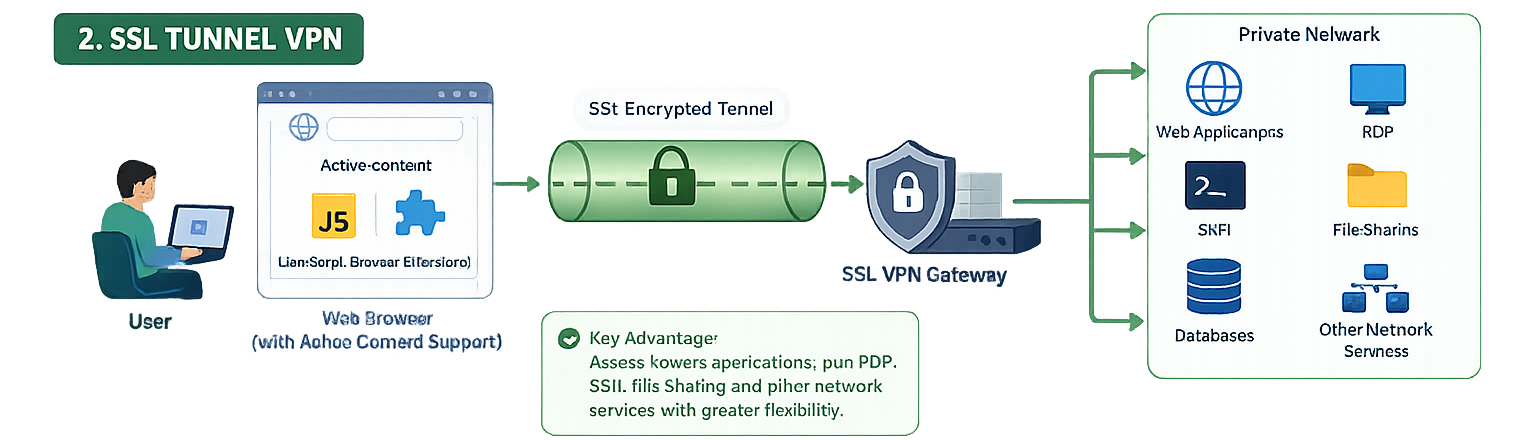
SSL Tunnel VPN එකක් මඟින් SSL ආරක්ෂිත Tunnel එකක් හරහා Web-based සේවාවන් පමණක් නොව, වෙනත් Network Applications සහ සේවාවන් වෙතද ආරක්ෂිත ප්රවේශයක් ලබා දේ.
මෙම VPN වර්ගය සඳහා Active Content (JavaScript, Browser Extensions වැනි) සමඟ ක්රියා කළ හැකි Web Browser එකක් අවශ්ය වේ. එම නිසා SSL Portal VPN එකකට වඩා වැඩි හැකියාවන් සහ නම්යශීලීභාවයක් (Flexibility) SSL Tunnel VPN සතුව ඇත.
ප්රධාන වාසිය: Web Applications වලට අමතරව RDP, SSH, File Sharing සහ අනෙකුත් Network Services වෙතද ප්රවේශ විය හැකි වීම.
IPSec VPN සහ SSL VPN තාක්ෂණයන් අතර වෙනස
සාම්ප්රදායික VPN විසඳුම් බොහොමයක් IPSec (Internet Protocol Security) භාවිතා කරමින් VPN සම්බන්ධතාවයේ අන්ත දෙක (Endpoints) අතර ආරක්ෂිත Tunnel එකක් නිර්මාණය කරයි. IPSec ක්රියා කරන්නේ OSI Model හි Network Layer එක මත වන අතර, එය සාමාන්ය Application එකක් ලෙස නොව Operating System එකේ Network Functions සමඟ ගැඹුරින් සම්බන්ධ වී ක්රියා කරයි.
IPSec VPN එකකට සම්බන්ධ වූ විට, Client Computer එක ආයතනයේ අභ්යන්තර ජාලයේ (Corporate Network) පරිගණකයක් මෙන් ක්රියා කරන අතර, අභ්යන්තර පරිශීලකයෙකුට ලබා ගත හැකි බොහෝ සම්පත් වෙත ප්රවේශ විය හැකිය. බොහෝ IPSec VPN විසඳුම් සඳහා විශේෂ Software හෝ Hardware ස්ථාපනය කිරීම අවශ්ය වේ.
IPSec VPN හි වාසි
✅ ඉහළ මට්ටමේ ආරක්ෂාවක් ලබා දේ.
✅ විශේෂිත Hardware සහ Software අවශ්ය වීම නිසා අනවසර ප්රවේශයන් අවම වේ.
✅ සම්පූර්ණ ජාලයට (Full Network Access) ආරක්ෂිත ප්රවේශයක් සපයයි.
IPSec VPN හි අවාසි
❌ Software Licensing සහ Maintenance සඳහා වැඩි පිරිවැයක් වැය වේ.
❌ Client Software ස්ථාපනය සහ යාවත්කාලීන කිරීම අවශ්ය වේ.
❌ Remote Users සඳහා Deployment සහ Technical Support සංකීර්ණ විය හැකිය.
SSL VPN තාක්ෂණය
SSL VPN මඟින් SSL/TLS Protocols භාවිතා කරමින් ආරක්ෂිත සම්බන්ධතාවයක් ස්ථාපිත කරයි. SSL/TLS අද වන විට සියලුම නවීන Web Browsers මඟින් ස්වයංක්රීයව සහාය දක්වන බැවින් අමතර Client Software ස්ථාපනය කිරීමේ අවශ්යතාවයක් බොහෝ විට නොමැත.
එබැවින් SSL VPN භාවිතා කිරීම ඉතා පහසු වන අතර, පරිශීලකයාට Web Browser එකක් හරහාම ආරක්ෂිතව ආයතනික සම්පත් වෙත ප්රවේශ විය හැකිය.
SSL VPN හි වාසි
✅ අමතර Client Software ස්ථාපනය අවශ්ය නොවේ.
✅ Web Browser එකක් පමණක් භාවිතයෙන් සම්බන්ධ විය හැකිය.
✅ විශේෂිත Applications සඳහා පමණක් ප්රවේශය ලබා දිය හැකිය.
✅ User Roles අනුව වෙනස් Access Rights ලබා දීම පහසුය.
✅ Deployment සහ Management සරල වේ.
SSL VPN හි අවාසි
❌ සාමාන්යයෙන් Web-Based Applications සඳහා වඩාත් සුදුසුය.
❌ Browser Security Issues (Malware, Phishing, Browser Vulnerabilities) මඟින් අවදානම් ඇති විය හැකිය.
❌ Web Portal එකක් Public Internet වෙත විවෘතව පවතින බැවින් ප්රහාරකයන්ගේ අවධානයට ලක් විය හැකිය.
❌ සම්පූර්ණ Network Access අවශ්ය අවස්ථාවල IPSec VPN තරම් සුදුසු නොවිය හැකිය.
SSL VPN වැදගත් වන්නේ ඇයි?
වර්තමානයේ ව්යාපාරික ආයතන, අධ්යාපන ආයතන සහ රාජ්ය ආයතන තුළ VPN තාක්ෂණය පුළුල් ලෙස භාවිතා වන බැවින්, එය භාවිතා කිරීමේ පහසුව සහ ප්රවේශ වීමේ හැකියාව ඉතා වැදගත් සාධක බවට පත්ව ඇත.
SSL VPN මඟින් අඩු තාක්ෂණික දැනුමක් ඇති පරිශීලකයන්ට පවා පහසුවෙන් සහ ආරක්ෂිතව ආයතනික සම්පත් වෙත ප්රවේශ වීමට හැකියාව ලබා දෙයි. එය නවීන Web Browser එකක් ඇති ඕනෑම පරිගණකයක්, Laptop එකක්, Tablet එකක් හෝ Smartphone එකක් හරහා භාවිතා කළ හැකිය.
SSL VPN නිවැරදිව වින්යාස කළ විට, එය IPSec VPN එකක් තරම්ම ඉහළ ආරක්ෂාවක් ලබා දීමට සමත් වේ. එමෙන්ම Client Software ස්ථාපනය කිරීමේ අවශ්යතාවය අවම වන බැවින්, පරිපාලනය සහ නඩත්තුවද පහසු වේ.
SSL VPN හි ප්රධාන වැදගත්කම්
✅ ඕනෑම ස්ථානයක සිට ආරක්ෂිතව වැඩ කිරීමට හැකියාව.
✅ Web Browser එකක් පමණක් භාවිතා කර ප්රවේශ විය හැකි වීම.
✅ Client Software ස්ථාපනය කිරීමේ අවශ්යතාවය අවම වීම.
✅ Remote Employees සහ Work From Home පරිසර සඳහා ඉතා සුදුසු වීම.
✅ ආයතනවල IT පිරිවැය සහ නඩත්තු වියදම් අඩු කිරීම.
✅ පරිශීලකයන්ට අවශ්ය Applications සහ Resources පමණක් ලබා දිය හැකි වීම.
✅ ආයතනයේ ආරක්ෂාව පවත්වා ගනිමින් ගෝලීය වශයෙන් ව්යාප්ත වීමට සහය වීම.
SSL VPN යනු නවීන ආයතන සඳහා අත්යවශ්ය ආරක්ෂිත දුරස්ථ ප්රවේශ (Remote Access) විසඳුමකි. එය භාවිතයේ පහසුව, අඩු පිරිවැය, ඉහළ ආරක්ෂාව සහ විවිධ උපාංගවලින් ප්රවේශ වීමේ හැකියාව හේතුවෙන් අද වන විට වඩාත් ජනප්රිය VPN තාක්ෂණයක් බවට පත්ව ඇත.
SSL VPN deployment checklist
Before enabling remote access, define who needs access, which applications they need and the smallest network range required. Create separate user groups for different roles rather than giving every remote user the same tunnel permissions. Pair authentication with MFA where available, and make sure the identity source, group mapping and portal rules have been tested with a non-administrator account.
Use this practical validation sequence:
- Confirm the public DNS name and certificate match the remote-access gateway.
- Verify a test user can authenticate and receives the intended portal or tunnel mode.
- Confirm the user can reach only the approved internal applications.
- Review firewall and VPN logs for the session, assigned address and policy match.
- Test name resolution, split tunnelling behaviour and disconnect/reconnect handling.
Troubleshooting secure remote access
Users cannot sign in
Check the public reachability of the gateway, certificate validity, user-group membership and the authentication server response. Treat a failed login as an identity or policy signal first; do not weaken the password, MFA or certificate requirements merely to complete a test.
Users sign in but cannot reach an internal application
Confirm the SSL VPN portal assigns the correct address pool and that a firewall policy exists from that pool to the target network. Check routing in both directions, DNS records for internal names and whether the application has its own access controls. Session logs will usually identify whether the traffic was denied, routed incorrectly or never resolved.
Security controls to keep in place
Use least-privilege portal rules, MFA, current certificates, timely firmware updates and regular review of remote-access logs. Remove accounts that no longer need access and keep an emergency access procedure that is audited and time-limited. A VPN is not just a connection method: it is part of the organization’s identity, monitoring and incident-response boundary.
When SSL VPN is the right fit
SSL VPN is useful when staff or support engineers need secure access to selected internal services from unmanaged networks. The right design depends on the applications, device posture, user identity and risk level. For broader zero-trust access requirements, evaluate the full access architecture rather than treating a single VPN configuration as the only control.
Get the next practical update from OneAccess
We'll send focused training, certification, and enterprise IT updates connected to this article. Your details are sent to our CRM follow-up workflow and saved in the local lead queue.